Tumblr vs WordPress: Which platform is best for building your blog?
Blogging has turned out to be a great digital marketing tool. It’s quick, fast, usually free, and it has great earning potential if done right. It is certainly an exciting, but daunting experience to launch ones personal blog. It may already give you goosebumps that people are possibly going to read and get motivated by your content, but like all other types of entrepreneurship, it’s not all rainbow and butterflies. You have to make some important choices.
Picking the best forum for your blog is one such critical decision. Finding the perfect platform for you is a daunting task, and we’re here to help you compare between the two giants of personal blogging.
WordPress and Tumblr Overview
In 2003, WordPress began its journey and is by far the most successful site on the market for blogging. WordPress has gradually developed from a simple blogging platform to a sophisticated content management system and is now still one of the most common options for eCommerce websites. WordPress comes in two variants, the hosted site WordPress.com and the self-hosted WordPress blog/WordPressorg. Both of them are theoretically free and collectively encapsulate almost 25% of the site.
Tumblr is a highly advanced forum for visual blogging. It is suited for bloggers who want to publish short-form content, such as micro-blogs, quotes, individual images, photo groups, videos, and animated GIFs. Tumblr is also a user community where people like to reblog posts from other users, and in the captions of these post, they can also add in notes. Tumblr is a great place to promote your business, with over 300 million blogs and over 550 million people visiting the site every month.
Benefits of both platforms
Benefits of BOTH platforms include:
- They are “free”, meaning there is no cost to use the platform’s software, though hosting and design/development for these platforms is not necessarily free.
- Free themes can be found and easily installed for either platform.
- Both platforms can be customized with unique design and constantly developing features.
- Both platforms are Content Management Systems (CMS) that can be updated from anywhere that you have an internet connection.
- Both platforms allow you to name your pages with Search Engine Optimization (SEO) that can help them be found in search engines (though Tumblr has a search engine disability that we will discuss below.). SEO is essential for startups to be able to match competition with a bigger market share in their respective industries.
- Both are somewhat easy to use, but training may be necessary if you’re not computer-savvy.
- Tumblr & WordPress both are VERY popular platforms that are well-maintained and will likely exist for some time to come. If you need to export your content away from these sites, both of the sites are capable to do so.
- Both platforms allow some importation of content from other CMS-driven platforms like Typepad and Blogger.
Cost and Usability
Tumblr has an incredibly user-friendly dashboard that makes it easy to update posts with text and multimedia. It guides you to publish different types of media in a way no other sites can. Tumblr is also simple easy to update and most smartphones have a downloadable Tumblr app available.
WordPress.com provides free hosting, but if you host the WordPress app on your server, the design and features are more restricted than what you have access to. So the “cost” is not for the program itself, but the hosting, design and creation of custom functions. WordPress also provides a relatively easy back-end (for tech-savvy folks) and supports various media formats such as images, audio, and video.
Tumblr is the hands-down winner when it comes to resharing content that others have shared. WordPress does not have built-in group features like “following” like-minded individuals, “reblogging” their messages and “liking” what someone else has posted so that it can be viewed by others in your friend’s list. There are, of course, ways to use resources offered by web browsers such as Firefox or bookmarklets that you can hold in a toolbar to share things, but this feature is easily built in to Tumblr
Functionality & Control
WordPress is a robust content management system that has a basic user back-end that enables non-tech experts to make changes to the website, plug-in, widget and sidebar. It can facilitate multi-page navigation and provide management and control of the database as a robust and informative website. WordPress software can be hosted on a user-controlled server that allows greater control over stats and personalization, or you can use WordPress.com to develop a hosted site (making it more similar to Tumblr in that regard).
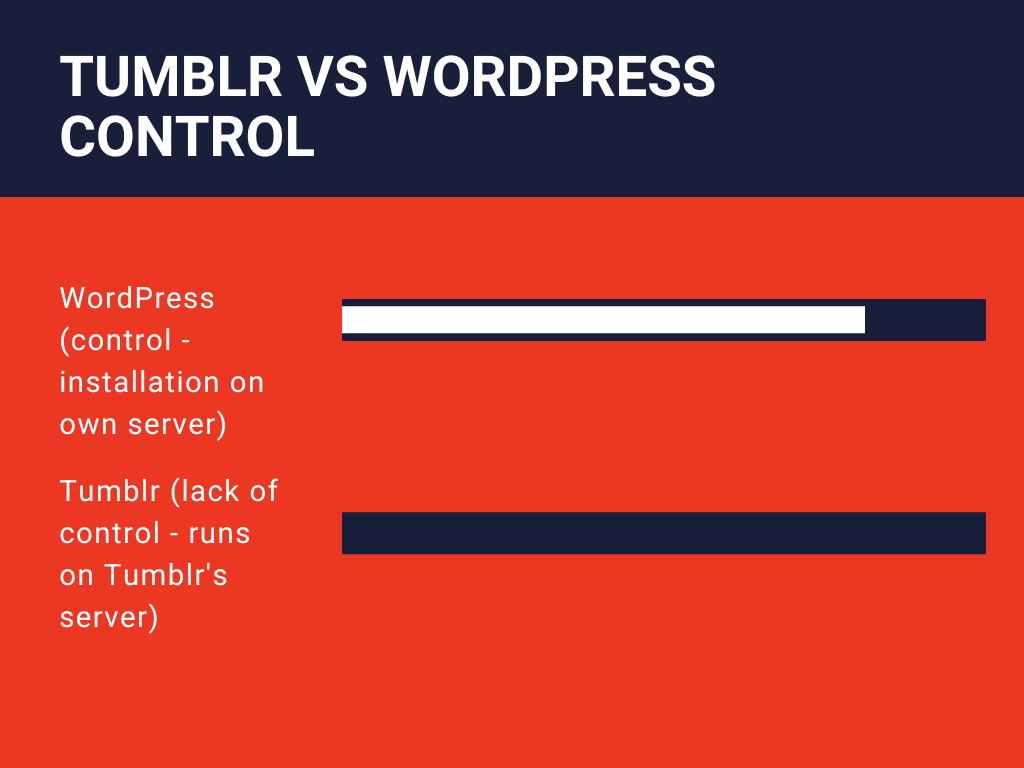
You can’t install Tumblr on your server, ever. Your site is hosted on the Tumblr.com website, though you can use a special URL instead of the address subdomain.tumblr.com. You have full control over your content, and if you want to move it away from Tumblr, you can export it and transfer it to another site.
Design and Customization
WordPress supports widgets/plug-ins that, without hard coding, can easily be added/customized, but Tumblr must be custom coded for pseudo-plug-in features (having items in the sidebars of a theme). WordPress requires native calendars and communication forms to be used, meaning you can update them all from the same back-end of WordPress. Tumblr will only support calendar and contact pages from third party sites that require a different log-in and some trick coding from the Tumblr back-end.
Both sites can be customized beautifully and provide in-site and off-site navigation to other places, but if you want to play with your site design and layout, WordPress is by far more extensible and versatile. WordPress is the way you need to go if you need to do big business with e-commerce, forms, listings, heavy content, ads and the like.
Authors & Permissions
With WordPress, you can have granular permission levels and several writers, with pictures and bios on each article, and several permission levels, from public to private, and password-protected sites. Tumblr is a one-ID-and-password pony. If you need several authors writing only in their area, with restricted permissions, WordPress does this but Tumblr does not.
Who Should Use Them?
WordPress
Professionals, entrepreneurs, serious writers, web marketers, and everyone who, without much hassle, needs an aesthetically pleasing site. More significantly, since it also provides a free hosted version, people who want freedom in selecting their domain and hosting space(s) can opt for WordPress. If you need total control over your content and hosted files, it is recommended to go to a hosting service such as BlueHost.
Tumblr
People who want to write about photography. In reality, it has deeper Flickr integration, making it easier to quickly build photo-based posts. For audio and video bloggers, Tumblr is also fine. It offers support for platforms such as SoundCloud, Twitter, Vimeo, Spotify and more with embedded support. Short-form text lovers will benefit from the microblogging emphasis of Tumblr as well. It is suitable for posting haikus, short poems, citations, etc. And using Tumblr to post those brief updates is quicker.
The verdict on Tumblr vs WordPress for blogging
Choosing between WordPress and Tumblr is dependent on what you want to do, who your audience is, what your technical threshold is for learning, and who is going to use the web to write content, plus your gut instinct. They are both free to set up an account in which to try out, so why not take a look at both and see which one catches your fancy? You won’t do much with them if you don’t enjoy using these resources, and that’s what matters if you want to start blogging or posting material. Although WordPress may be the choice for the serious blogger, Tumblr might have some plus points in terms of convenience…etc. Here are some tips if you’re looking to easily get started blogging with Tumblr.
is tumblr good for blogging
gf
Tumblr blog examples: What are some of the best Tumblr blogs out there?
das
Tumblr blog examples for writers
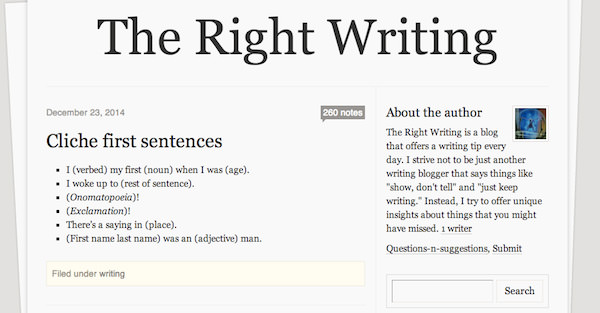
1. The Right Writing
“A tip a day keeps writer’s block away.” This, in a nutshell, is The Right Writing‘s tagline (if it had one). Unlike most writing blogs, TRW does its best to give more than generic writing advice such as “Set a daily writing quota” or “Just keep hammering away at your keyboard”. Instead, it gives specific, actionable tips on how to craft a first line, how to describe a character, how to craft an eye-catching title, etc. The blog also occasionally posts interesting, writing-related links.
2. Quotes From Books
Whether you need life advice from the world’s greatest writers, or inspiration for writing awesome lines, Quotes from Books is the blog to follow. The site also provides book recommendations, in case you’re looking for something new to read. After all, writers need to read as much – if not more than – they write, right?
4. WordStuck
One of a writer’s greatest weapons is an expansive vocabulary, and WordStuck does a wonderful job of filling that need. The site regularly posts about words from around the world and their respective meanings, framed in beautiful graphics created by the blogger. It’s especially fun when the site posts words that have no direct English translation – and you’re a native speaker of the language that uses that word!

5. Yeah Write
Yeah Write doesn’t just dish out writing advice, post daily prompts, and write about industry news, it also encourages writers to come together as a community through their “workshopper” program, where people can publicly offer their editing / proofreading / workshopping services. Whether you need any of these services or not, Yeah Write is a must-follow site.

6. Writing Problems
Ever felt that you’re the only one who suffers from (insert writing problem here)? Don’t worry; Writing Problems is here to let you know that, yes, you’re not the only one who types a word, presses “Backspace”, types that word again, and presses “Backspace” again. Scroll through their posts for a dose of side-splitting, “Hey, I can relate to this!” humor, and feel your writing-related stress melt away.

Tumblr blog examples for designers
01. This isn’t Happiness
It’s hard to think of a Tumblr we love more than Pete Nidzorski’s This isn’t Happiness. Mixing up art, design, vintage photography and strange running themes that you’ll get to recognise after following it for a while, it’s a daily helping of cool stuff that’s never less than entertaining and often thoroughly inspiring.RECOMMENDED VIDEOS FOR YOU…CLOSEhttps://imasdk.googleapis.com/js/core/bridge3.517.2_en.html#goog_4059978130 seconds of 2 minutes, 57 secondsVolume 0% PLAY SOUND
02. We and the Color
Founded by Dirk Petzold in 2010 to promote the most outstanding creative ideas of artists and designers from around the world, We and the Color aims to inspire people and show that creativity has no bounds. Expect a variety of posts covering art, design, illustration, photography, architecture, fashion, animation, filmmaking and more.
03. Design Clever
Design Clever is a collaboration by Jonathan Ring and Bethany Baker – two aspiring graphic designers with a passion for everything design related. So, they created this brilliant Tumblr blog to collate anything and everything that inspires them. “This blog was created to showcase talented designers all over the world and their amazing talents,” they explain. If you’d like to be part of it, submit your work.
04. Design Cloud
Design Cloud is a carefully selective and informed blog that features images of new work covering a wide range of design fields, from graphic design to architecture. This Tumblr blog is beautifully laid out and easy to navigate.